Build Your Own Otto Robot: DIY 3D Printing & Robotics Guide
Summary: Discover how to create your own interactive Otto Robot from scratch! This step-by-step guide covers hardware selection, 3D printing components, servo motor calibration, mechanical assembly, Arduino programming, and dynamic showcases of Otto walking and dancing.
Whether you are an engineering student, a maker, or a curious hobbyist, building your own companion robot is an extremely rewarding project. The Otto Robot is an open-source, 3D-printable bipedal robot designed to walk, dance, avoid obstacles, and play audio. In this comprehensive project guide based on the tutorial video, we walk you through the full build workflow—from raw parts to a fully functional interactive companion.
src: /assets/models/otto/Copy_Otto DIY Humanoid robot_VINJO.stl
caption: Interactive 3D Model: OTTO
color: #10b9
autoRotate: true
Key Takeaways
- Beginner-Friendly Robotics: Otto combines 3D-printed structural components with affordable electronic boards like the Arduino Nano and SG90 servos.
- Servo Motor Calibration is Crucial: Before assembling legs and feet, calibrating the servo neutral positions (90°) ensures your robot moves and walks correctly without binding.
- Interactive Capabilities: Equipped with an ultrasonic distance sensor, Otto can detect obstacles in real-time, adjust its path, perform dynamic dance routines, and execute custom movements.
Hardware & Required Parts
Before starting the build, you'll need to gather the necessary electronics, tools, and printing supplies. Below is the full breakdown of recommended parts:
| Component / Tool | Function / Description | Recommended Link |
|---|---|---|
| 3D Printer | Used to print Otto's head, body, legs, and feet (e.g., Ender 3 S1 Pro) | Buy Ender 3 S1 Pro |
| Microcontroller | Arduino Nano (Brain of the robot) | Buy Arduino Nano |
| Expansion Board | Multipurpose Nano Shield for easy servo & sensor wiring | Buy Expansion Board |
| Servo Motors | 4x SG90 Micro Servo Motors (2 for legs, 2 for feet) | Buy SG90 Servo Motor |
| Ultrasonic Sensor | HC-SR04 for obstacle detection and distance sensing | Buy Ultrasonic Sensor |
| Servo Tester | Calibrating micro servos before final mounting | Buy ServoTester |
| Breadboard | Prototyping and testing signal lines | Buy Breadboard |
| USB Cable | USB 2.0 A to Mini B cable for programming Arduino Nano | Buy SRP Cable |
| Soldering Iron Kit | Hardware connections and wiring adjustments | Buy Soldering Iron Kit |
Step-by-Step Assembly Workflow
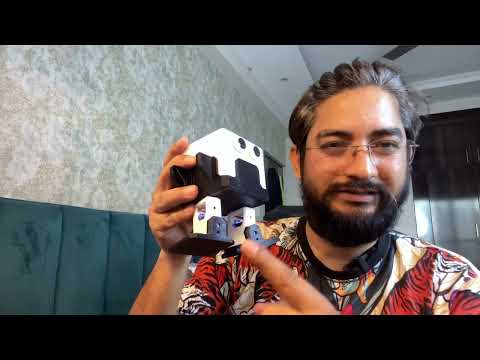
1. Hardware Overview & Prep (00:00:23)
Start by gathering all components listed in the parts table. Using an Arduino expansion shield simplifies the wiring significantly by providing dedicated 3-pin headers (Signal, VCC, GND) for each SG90 servo motor, eliminating messy wire bundles.
2. 3D Modeling and Printing (00:00:42)
Otto's shell consists of four core 3D printable parts:
- Head: Houses the ultrasonic eye sensors and optional buzzer/speaker.
- Body/Torso: Houses the Arduino Nano board, expansion shield, and battery pack.
- Legs (x2): Connect the body servos to the feet servos.
- Feet (x2): Provide base stability for walking and dancing motions.
You can modify or customize these STL files in CAD software like Tinkercad before sending them to your 3D printer.
Servo Calibration & Assembly
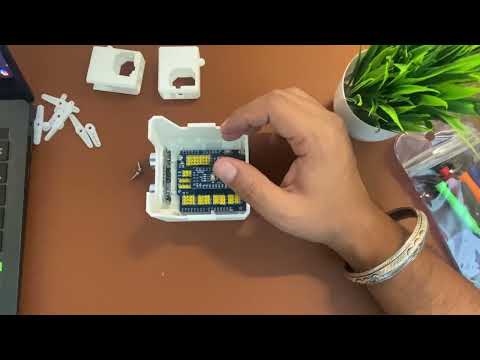
3. Servo Motor Calibration (00:01:12)
Crucial Tip: Never attach the mechanical leg links without first setting your servo motors to their 90-degree center positions!
- Connect your 4x SG90 micro servos to a dedicated hardware servo tester or upload a calibration sketch to your Arduino Nano.
- Force all four servos into their exact center point (90°).
- Keep the power connected or maintain shaft alignment while fastening the structural servo horns.
4. Assembling Otto (00:02:30)
- Leg & Foot Assembly: Mount the two foot servos into the printed feet, then attach the printed leg segments using tiny screws.
- Body Integration: Insert the two leg servos into the main body housing. Pass the servo cables through the interior channels into the main cavity.
- Sensor Installation: Snap the ultrasonic distance sensor into the eyes slots on the printed head.
- Mainboard Mounting: Place the Arduino Nano and expansion shield inside the torso, routing all signal wires according to your pinout map. Secure the head unit onto the body chassis.
Coding and Bringing Otto to Life
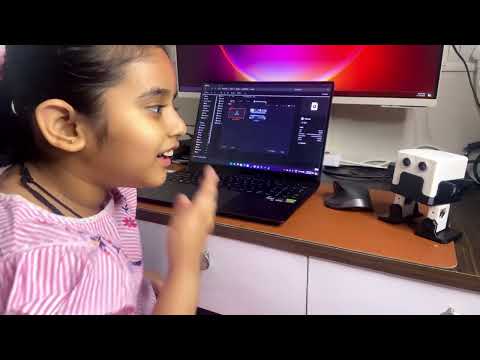
5. Coding & Behavior (00:04:17)
To program Otto, connect the Arduino Nano to your PC using the USB Mini-B cable. Open the Arduino IDE, load the official Otto DIY library routines, and define your movement loops.
Key coding routines include:
- Obstacle Avoidance: Continuously pinging the HC-SR04 ultrasonic sensor. If an object is detected within a set threshold (e.g., 15 cm), trigger a reverse walk or turn command.
- Gait Control: Alternating leg and foot servo angles to produce smooth forward, backward, left, and right stepping motions.
- Dance Sequences: Combining rapid ankle and hip tilt movements for playful dancing routines.
6. Showcasing Otto in Action (00:05:02)
Once programmed, disconnect the USB cable, switch on external battery power, and watch Otto interact! Otto will perform dynamic walking routines, navigate around furniture legs, dance to rhythmic commands, and react intelligently to obstacle proximity.
Useful Project Resources & Links
Explore these official CAD models, build documents, and reference guides to start printing and assembling your robot today:
- Assembly Guide PDF: Download Full Assembly Guide
- 3D Design File: View Project on Tinkercad
- Project Walkthrough: Read Instructables Tutorial