Unbelievable Bat Transformation: Build a DIY Smart Cricket Bat with RP2040
Summary: The Smart Bat Project demonstrates how cricket enthusiasts can build their own performance analysis device using the RP2040 microcontroller, custom 3D-printed housing, and a modern GUI built with SquareLine Studio and LVGL. Learn how to track swing speed, sweet spot contact, and real-time metrics without spending a fortune on high-end commercial tech.
Key Takeaways
- Accessible Performance Analytics: Build professional-grade batting analysis electronics at a fraction of the cost of commercial sports sensors.
- Embedded Graphics Power: Leverage the RP2040 microcontroller alongside SquareLine Studio and LVGL to render sleek, real-time UI dashboards on a round LCD display.
- End-to-End Build: Master a complete hardware workflow encompassing microcontroller programming, custom 3D printed mounting, battery integration, and physical bat fitting.
Hardware & Software Specifications
| Category | Component / Resource | Resource Link |
|---|---|---|
| Display & MCU | Round Display Module (RP2040) | Buy Display on Amazon |
| Power Supply | Compact Rechargeable LiPo Battery | Buy Battery on Amazon |
| UI Design Software | SquareLine Studio | SquareLine Studio Website |
| Graphics Library | LVGL (Light and Versatile Graphics Library) | LVGL Official Site |
| Project Code | Microcontroller Source Code | GitHub Repository |
| 3D Print Assets | Enclosure STL Files | Google Drive STL Folder |
Detailed Overview

1. Introduction & Hardware Setup
Commercial cricket performance sensors often carry exorbitant price tags. The Smart Bat Project bridges this gap by demonstrating how off-the-shelf microcontrollers can collect and present key shot data right on the bat itself.
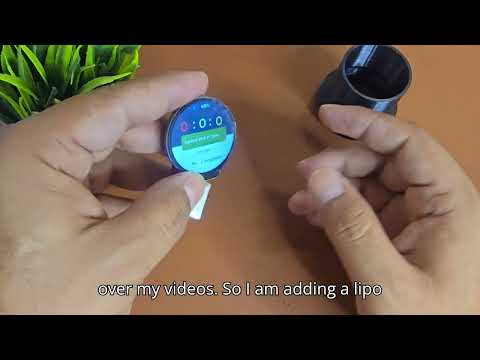
The core of the system is driven by an RP2040 microcontroller paired with a compact, high-resolution round LCD display. Powered by a small rechargeable battery, this setup allows for lightweight, unobtrusive monitoring of key parameters like swing velocity and contact point analysis.
2. User Interface & GUI Development
Creating a readable, sleek user interface on a small round screen requires specialized graphics software:
- SquareLine Studio: Used to visual design dashboard elements, gauge meters, and layout components tailored for circular screens.
- LVGL (Light and Versatile Graphics Library): Renders high-performance, low-memory UI graphics optimized for microcontrollers like the RP2040.
3. Firmware Coding & 3D Enclosure Design
Once the visual interfaces are finalized in SquareLine Studio, the generated code is integrated with the project firmware using the RP2040 SDK/Arduino environment to process sensor inputs and handle screen updates.
To protect delicate electronics from high impact during batting practice, a rugged outer shell is designed using 3D CAD modeling. The housing is specifically shaped to snap securely onto the cricket bat handle or spine while keeping weight distribution balanced.
4. Assembly, Bat Fitting, and Field Testing
The hardware assembly involves wiring the battery supply to the main RP2040 display module and fitting the entire unit into the custom 3D-printed enclosure.
After mounting the smart module securely onto the cricket bat, field testing verifies screen responsiveness, durability during impacts, and live feedback accuracy during real swings. The result is a fully functional, smart-enabled cricket bat ready for practice sessions.