Designing & 3D Printing a Custom Raspberry Pi Camera Case in Onshape
Summary: A step-by-step breakdown of how to design a protective and sleek custom camera case for the Raspberry Pi Camera Module using Onshape cloud CAD, slicing the model, and printing it cleanly on an Ender 3 S1 Pro printer managed by OctoPrint.
Key Takeaways
- Parametric CAD Modeling: Utilizing Onshape's browser-based features to model exact dimensions for the Raspberry Pi Camera Module lens and mounting holes.
- Precision 3D Printing: Achieving accurate tolerances on the Ender 3 S1 Pro for a snap-fit or screw-fastened camera enclosure.
- Workflow Automation with OctoPrint: Wirelessly monitoring and managing the 3D print process remotely.
Detailed Overview
Protecting small electronic components like the Raspberry Pi Camera Module is essential for robotics, time-lapse setups, and smart home projects. Creating a custom 3D-printed enclosure ensures perfect clearance for the camera lens, ribbon cable, and mounting points.

Step 1: CAD Design in Onshape
The project begins inside Onshape, a powerful cloud-based parametric CAD platform.
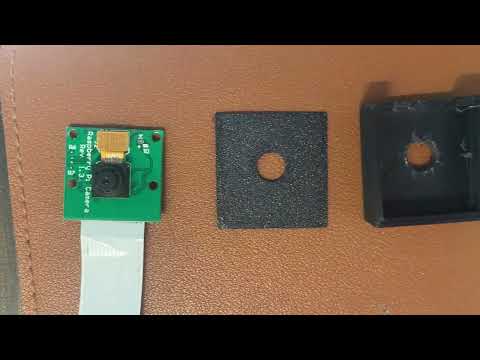
- Dimensional Layout: Taking precise measurements of the Raspberry Pi Camera PCB board, mounting hole positions, and lens height.
- Sketching & Extrusion: Sketching the outer frame and applying extrusions to form a two-piece housing (front plate and back cover).
- Cable Cutouts & Lens Port: Adding dedicated openings for the flexible flat ribbon cable to pass through without strain, alongside a centered aperture for the camera lens aperture.
Step 2: Exporting and Slicing
Once the 3D geometry is finalized in Onshape, the parts are exported as STL files for slicing:
- Layer Height: Optimized for fine detail around small screw holes or press-fit pins.
- Infill: 15% to 20% infill provides more than enough structural rigidity for a light camera housing.
- Orientation: Orienting the flat surfaces downward onto the build plate minimizes the need for support structures.
Step 3: Printing with Ender 3 S1 Pro & OctoPrint
With the G-code generated, the file is sent directly to the Ender 3 S1Pro setup, which is integrated with OctoPrint.
OctoPrint enables seamless wireless monitoring of the print job, real-time temperature tracking, and precise control over the printing process. The Ender 3 S1 Pro delivers clean layer lines and reliable bed adhesion, producing a tight-fitting case ready for immediate assembly.
Technical Specifications & Tools
| Component / Tool | Details | Link / Resource |
|---|---|---|
| CAD Software | Onshape (Cloud Parametric CAD) | Onshape |
| 3D Printer | Creality Ender 3 S1 Pro | Ender 3 S1Pro |
| Print Server | OctoPrint | OctoPrint |
| Target Hardware | Raspberry Pi Camera Module | Standard Module Form Factor |
Conclusion
Combining cloud CAD modeling in Onshape with direct print monitoring via OctoPrint provides a smooth, repeatable maker workflow. Custom enclosures keep delicate hardware like the Raspberry Pi Camera Module safe while keeping your workspace organized and functional.