DIY Pulse Oximeter with ESP32 XIAO and MAX30102 Sensor
Summary: Build an ultra-compact, personal IoT pulse oximeter to measure heart rate and oxygen saturation (SpO2) levels using an ESP32 C3 XIAO board, a MAX30102 pulse sensor, and an OLED display.
Key Takeaways
- Health Tracking at Home: Assemble a functional pulse oximeter using accessible microcontrollers and optical sensors.
- Ultra-Compact Hardware: Utilize the tiny ESP32 C3 XIAO microcontroller alongside an OLED screen for portable, low-power health monitoring.
- 3D Printed Enclosure: Finalize your DIY prototype into a sleek handheld unit using 3D printing components.
Required Hardware & Specs
To complete this DIY pulse oximeter project, you will need the following components:
| Hardware Component | Function / Role | Link |
|---|---|---|
| ESP32 C3 XIAO | Compact WiFi/BLE Microcontroller | Buy Here |
| MAX30102 Sensor | High-sensitivity Pulse Oximeter & Heart-Rate Sensor | Buy Here |
| OLED Display | Screen for real-time data output (SpO2 & Heart Rate) | Buy Here |
| Breadboard | Circuit breadboard for component testing | Buy Here |
| Jumper Wires | Interconnecting wires | Buy Here |
| Ender 3 S1 Pro | 3D printer for custom housing enclosure | Buy Here |
Detailed Overview
1. Circuit Prototype Assembly
The core of this health monitor relies on the MAX30102 sensor (or MAX30100 variant), which uses optical LEDs to measure blood oxygen levels and pulse rate from your fingertip.

Begin by connecting the MAX30102 sensor and the OLED display to the ESP32 C3 XIAO micro-controller on a standard breadboard. Wire up the I2C communication lines (SDA/SCL) and ensure proper power connections (3.3 V / GND) across all components.
2. Sensor Integration and Data Display
The MAX30102 module measures heart rates and blood oxygen concentration ($SpO_2$) simultaneously using red and infrared light absorption techniques.
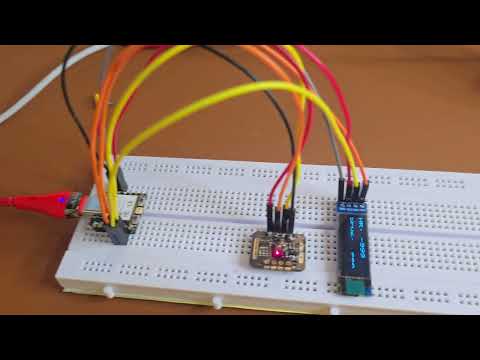
Once wired, the ESP32 processes the data coming from the MAX30102 optical sensor and outputs live pulse rate and $SpO_2$ percentages directly onto the attached OLED screen in real time.
3. Firmware and Code Setup
You can program the ESP32 XIAO board using Arduino IDE or MicroPython environment to interface with the MAX30102 sensor libraries.

- Access the project source code directly on GitHub: Project Code
- Read the full step-by-step written tutorial on Robu.in: Original Blog Link
4. Custom Housing and Enclosure
For a clean, finished product, you can design and 3D print a custom handheld case using a printer like the Ender 3 S1 Pro. Encasing the breadboard, ESP32 XIAO, OLED display, and MAX30102 sensor into a 3D-printed enclosure turns this prototype into a rugged, portable device ready for everyday personal health monitoring.