I Made a DIY 3D Printed Hollow Clock!
Summary: Step into the world of creative maker engineering by building a captivating, centerless 3D printed hollow clock. Powered by an Arduino Nano and a precision 28BYJ-48 stepper motor, this project blends mechanical design with electronics to produce a striking centerpiece for any room.
Key Takeaways
- Mesmerizing Centerless Design: The hollow clock operates without a traditional central shaft, moving its hands along an open outer gear ring.
- Accessible & Affordable Electronics: Driven by a low-cost Arduino Nano microcontroller, a 28BYJ-48 stepper motor, and a ULN2003 driver board.
- Easy DIY Build: Printable on standard FDM 3D printers like the Creality Ender 3 series using open-source code and STL models.
Project Specifications & Hardware List
To replicate this hollow clock project, you will need a few standard maker tools, 3D printing equipment, and electronic components:
| Component | Function / Details | Product Link |
|---|---|---|
| 3D Printer | Creality Ender 3 S1 Pro / Ender 3 Pro | Ender 3 S1 Pro |
| Microcontroller | Arduino Nano | Arduino Nano |
| Stepper Motor & Driver | 28BYJ-48 Stepper Motor with ULN2003 Driver Board | Stepper Motor & Driver Kit |
| Magnets | 8 mm x 3 mm Neodymium Magnets | 8 mm x 3 mm Magnets |
| Prototyping Board | Standard Prototyping Breadboard | Breadboard |
| USB Cable | USB 2.0 A to Mini B Cable (30 cm) | SRP Cable for Arduino Nano |
| Assembly Tools | Soldering Iron Kit | Soldering Iron Kit |
Detailed Overview
Understanding the Hollow Clock Mechanism
Unlike standard clockworks that rely on a central axle to rotate the hour and minute hands, a hollow clock uses a centerless rim gear system. The motor is hidden inside the base, driving internal pinions that mesh with teeth surrounding the giant outer ring.
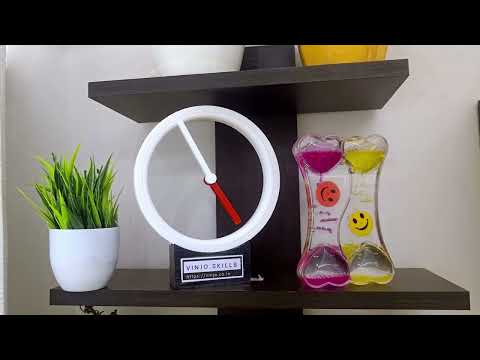
The hands attach to concentric floating rings held in place by precise tolerances and 8 mm x 3 mm magnets, producing an optical illusion where the clock hands appear to float freely in the air.
3D Printing the Parts
Printing the structural components requires precise print bed leveling and accurate dimensional calibration to ensure the gears mesh smoothly without binding.
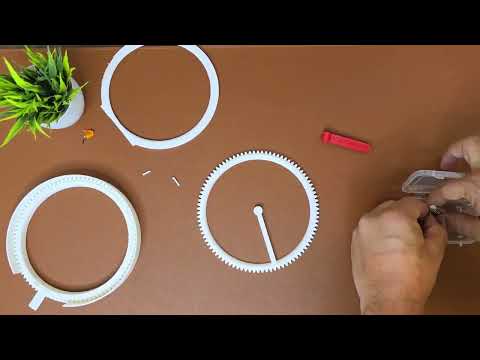
Printing Guidelines:
- Printer Used: Creality Ender 3 Pro / Ender 3 S1 Pro
- Material: PLA or PETG for rigid gears
- Infill: 15% to 20% grid infill for structural stability
- Layer Height: 0.2 mm (or 0.16 mm for smoother gear teeth)
Electronics Setup & Wiring
The brain of the clock is an Arduino Nano connected to a 28BYJ-48 Stepper Motor via a ULN2003 Driver Board. The Arduino sends step sequences to the motor at precise time intervals to accurately turn the time-keeping gears.
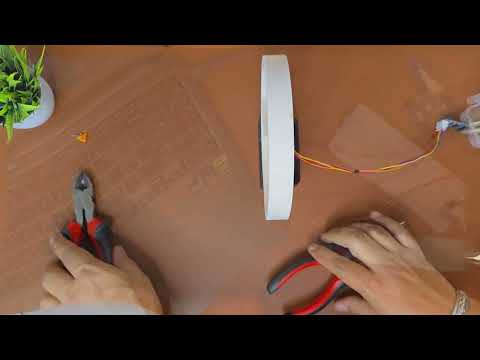
Basic Connection Steps:
- Connect control pins D4, D5, D6, D7 from the Arduino Nano to the IN1, IN2, IN3, IN4 pins on the ULN2003 driver board.
- Supply power to the driver board and Arduino Nano via the USB Mini-B cable.
- Secure the stepper motor tightly inside the clock base enclosure so the drive gear properly interfaces with the main ring gear.
Download Resources & Links
Access the original code, 3D model files, and technical design documentation from the creators below:
- 👨💻 GitHub Code Link: Get Arduino Code
- 🗄️ 3D Model STL Files: Download 3D Print Files
- 🅱️ Original Instructables Guide: Refer to Original Creator's Instructables Post