The landscape of generative AI for 3D modeling is evolving at a breakneck pace. No longer confined to coarse, blobby approximations, modern AI tools are starting to generate highly structured, textured assets from simple 2D inputs. Among the most popular of these tools is Meshy, a web-based AI generator designed to quickly turn photos, drawings, and text prompts into fully textured 3D models.
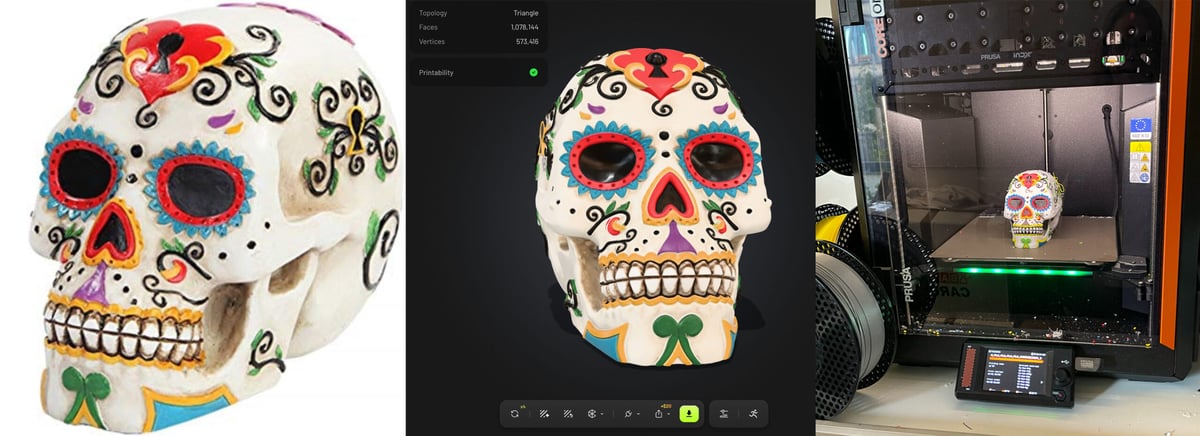
When evaluating these tools for physical manufacturing, our selection criteria focus heavily on geometric fidelity, water-tightness (printability), texture mapping accuracy, and workflow efficiency. With the release of Meshy 7.1, the platform introduces an Ultra 4K mode alongside its traditional Ultra 2K and chat-based Agent Beta options. We put these features through a series of real-world trials to find out if the extra digital resolution yields better physical results.
Detailed Breakdown of Meshy 7.1 Generation Modes
1. Meshy Ultra 4K Mode
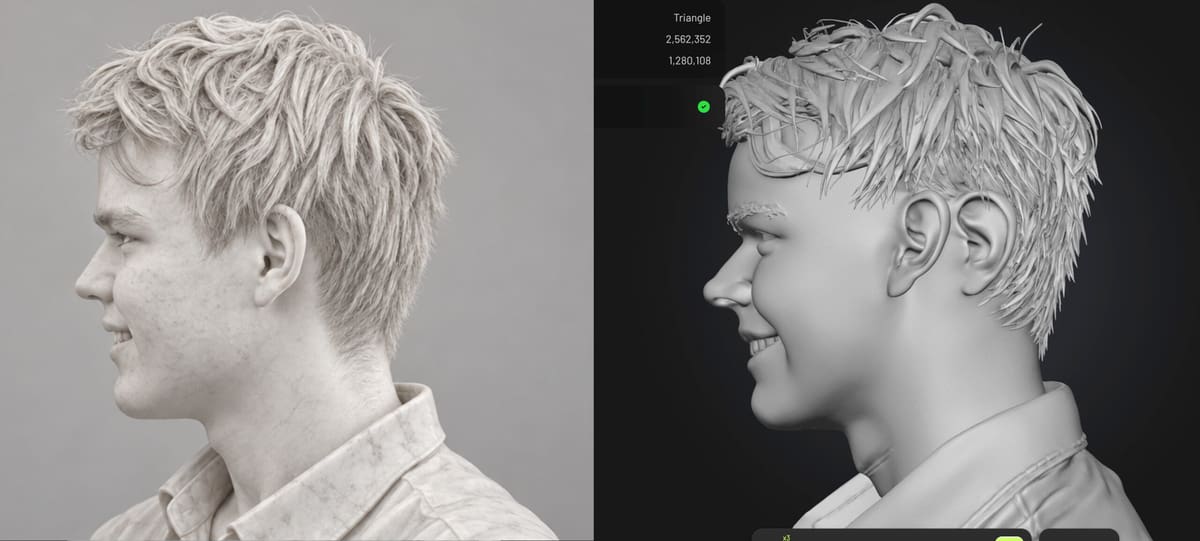
Ultra 4K is Meshy’s flagship high-resolution mode, designed to capture intricate textures, grooves, and complex structural features directly from a single 2D image.
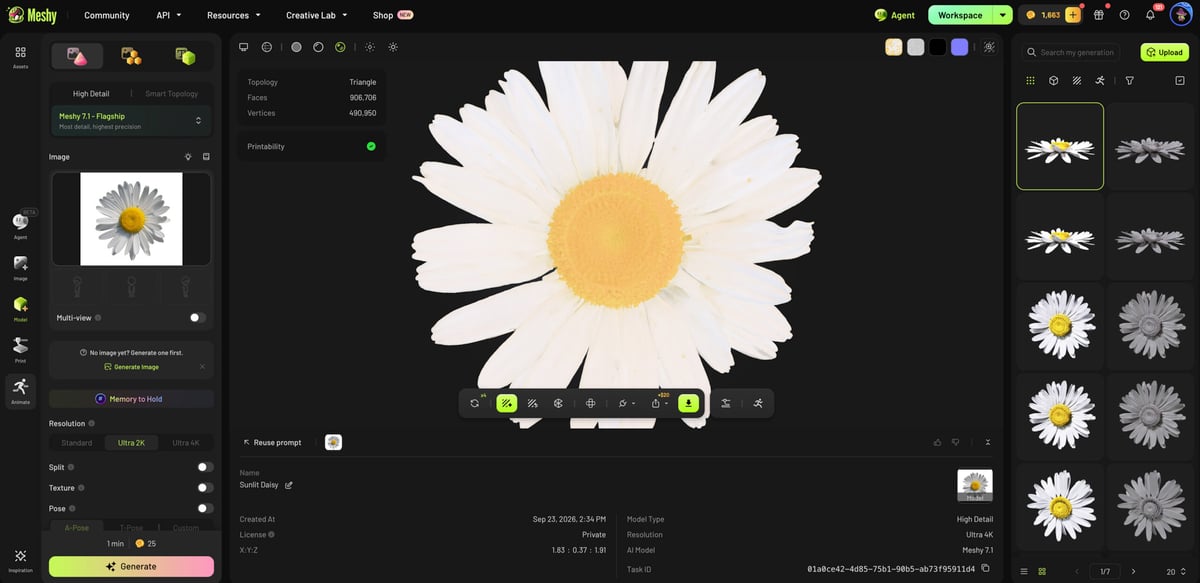
- Fidelity and Structure: The Ultra 4K mode excels at preserving precise geometry. In our daisy test, it flawlessly interpreted all 31 petals, matching the configuration and boundaries of the original photo.
- Depth Interpretation: When processing hollow objects like vases and pitchers, Ultra 4K recognizes internal spaces, creating printable, hollowed-out geometry with proportionally accurate wall thicknesses instead of solid blocks.
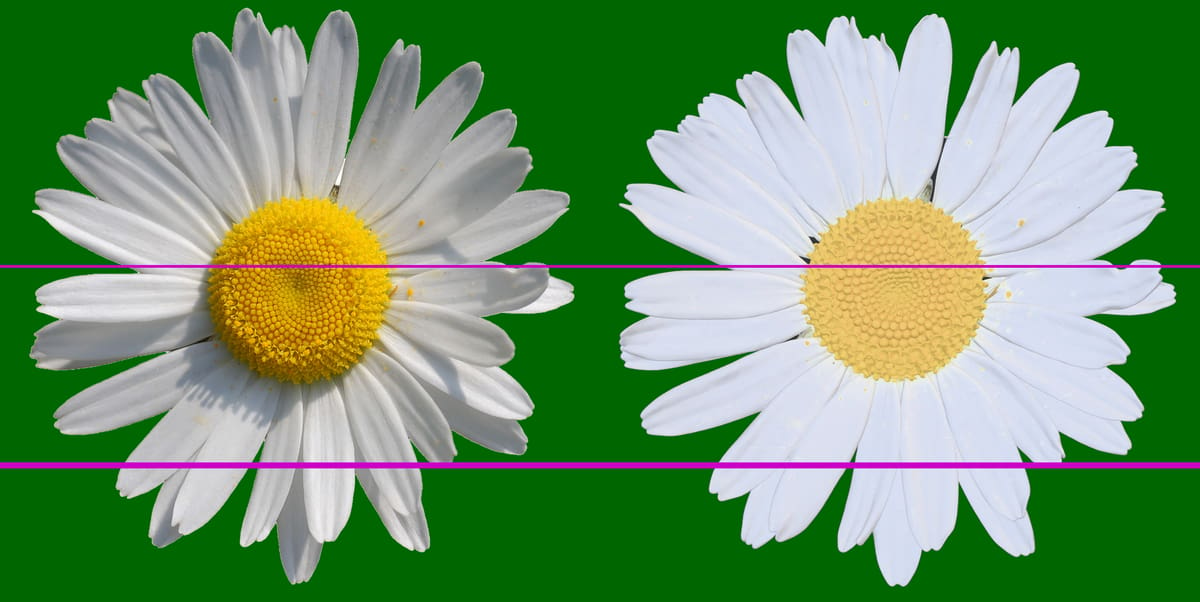
Key Specs:
- Maximum Raw Mesh Detail: Up to 80 million triangles (before simplification)
- Target Print Size: Up to 75 cm without detail loss
- Geometry Reconstruction: High-fidelity hollow and shell generation
- Multi-Color Output Support: Direct 3MF export with color mapping
Pro-Tip: If you are seeking dimensional accuracy, do not toggle on the "image enhancement" option. Its automated AI interpretation can drift away from the source photo and reduce the overall fidelity of the final mesh.
2. Meshy Ultra 2K Mode
The standard Ultra 2K generation mode is faster and consumes fewer generation credits, but it struggles with complex internal volumes and overlapping details.
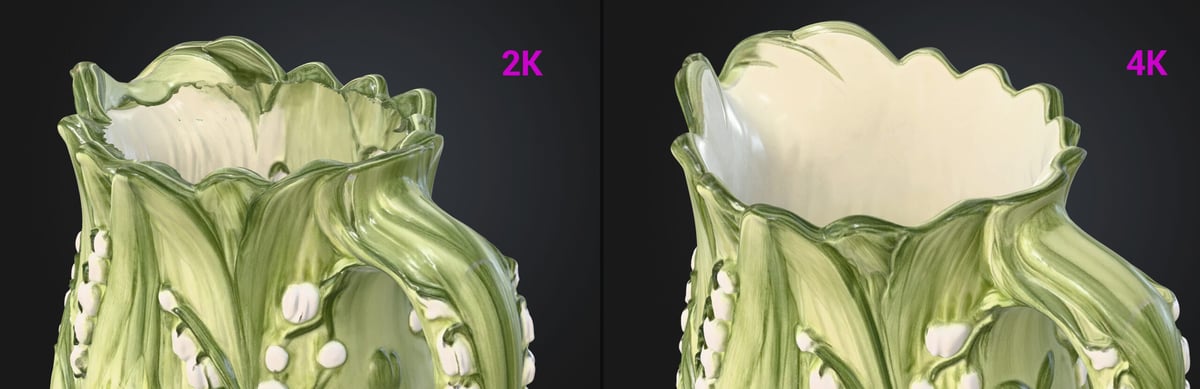
- Detail Resolution: Finer details can become muddy. Shadows in the source image are occasionally misread as physical tears or duplicate overlapping surfaces.
- Internal Geometry Limitations: During our vase and pitcher tests, the Ultra 2K engine filled the internal volumes completely or produced incomplete, paper-thin walls that failed slicing pre-checks.
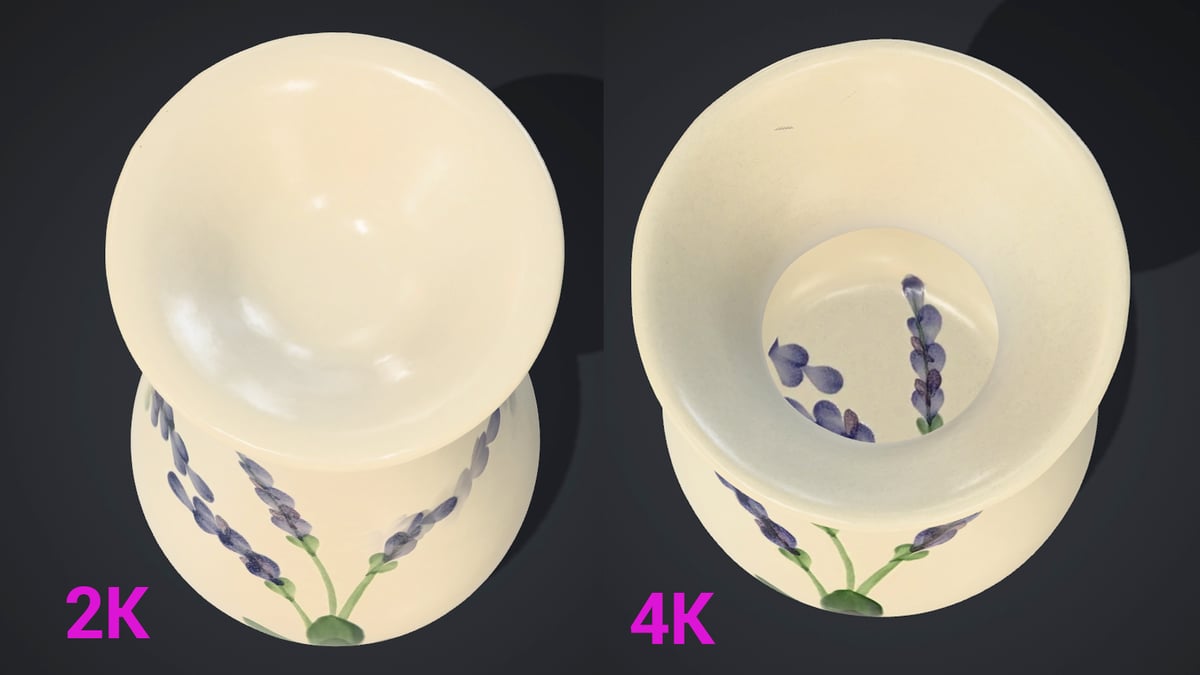
Key Specs:
- Mesh Complexity: Generally produces lower polygon counts suited for fast loading
- Geometry Reconstruction: Frequently outputs solid shapes or non-manifold shells
- Slicer Usability: Requires manual CAD thickening or healing before printing
- Best Suited For: Distant digital assets or simple flat geometries
3. Meshy Agent Beta Mode
Meshy Agent Beta introduces an interactive, chat-based interface that allows users to refine designs iteratively using natural language.
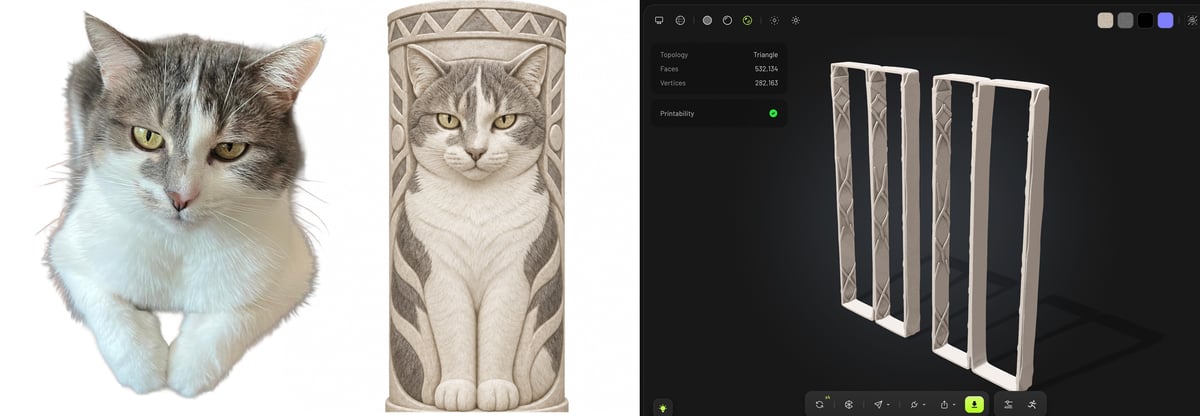
- Workflow Integration: Instead of guessing parameters, users can select specialized templated "skills" such as Marble Statue Me, Pet Memorial, or Creature Totem to guide the AI’s style parameters.
- Iterative Refinement: Allows back-and-forth chat prompts to make changes before final model rendering. However, during testing, the 2D-to-3D translation phase experienced stability issues, sometimes generating flat frame structures or duplicate pillars instead of a single, coherent 3D totem.
Key Specs:
- Interface Type: Conversational Chat with prompt-based refinement
- Image Requirements: Accepts multi-view images (Front, Back, Profile)
- Credit Cost: 12 credits per concept draft step
- Development Stage: Public Beta (prone to timeouts on complex shapes)
Pro-Tip: If you have access to the desktop version of ChatGPT, open Meshy via the browser inside of ChatGPT. This allows the conversational AI to guide you through selecting the correct tools, minimizing trial-and-error runs and saving valuable generation credits.
Multi-Color Print & Color Mapping
One of the stand-out features of the Meshy 7.1 workflow is its Multi-Color Print tool. For textured objects like our hand-painted vase and pitcher, the software maps colors to specific areas of the model and formats them into an exportable 3MF file.
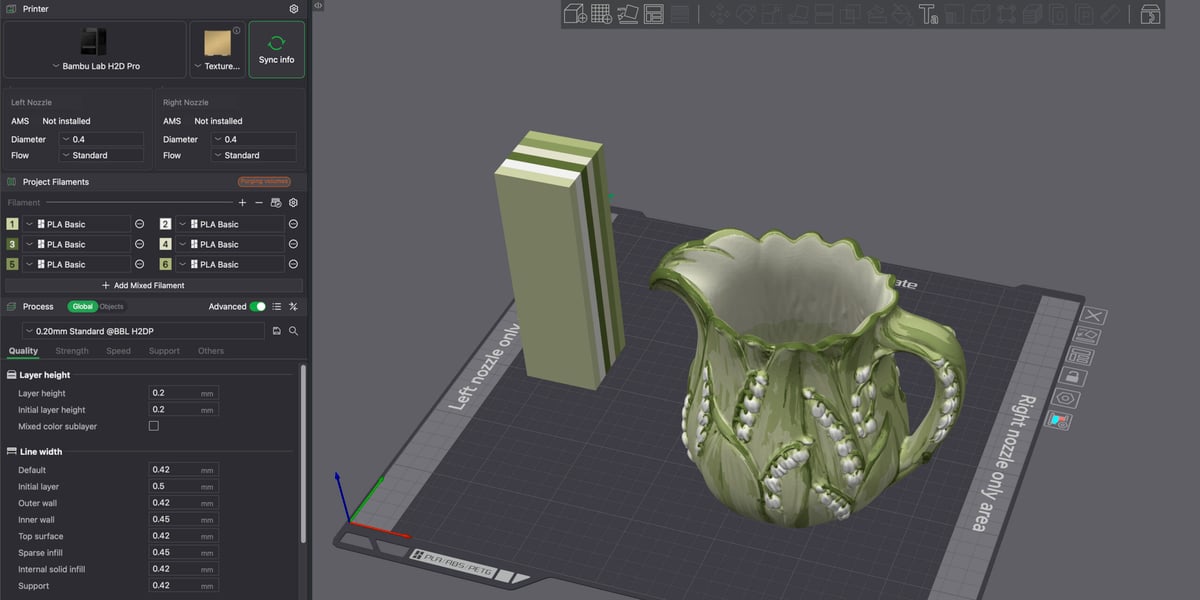
This map can be imported directly into multi-material slicers, such as Bambu Studio or PrusaSlicer, matching the colors to the filaments loaded in your printer's toolchanger or material management system automatically.
Feature Comparison Matrix
| Feature / Mode | Meshy Ultra 4K | Meshy Ultra 2K | Agent Beta (BETA) |
|---|---|---|---|
| Modeling Type | High-Res Single-Image AI to 3D | Fast Single-Image AI to 3D | Conversational Multi-View AI |
| Platform | Web Browser / ChatGPT | Web Browser / ChatGPT | Web Browser / ChatGPT |
| Mesh Resolution | Up to 80M triangles (raw) | Standard low-poly mesh | Variable based on concept |
| Hollow Volume Support | Yes (Accurate shell generation) | No (Outputs solid or non-manifold) | Limited by template skill |
| Direct 3MF Export | Yes | Yes | Yes |
| Pricing Plan | Pro Subscription (~$20/mo) | Free & Pro Subscriptions | Pro Subscription (~$20/mo) |
Summary & Final Recommendation
Does the new Ultra 4K mode really improve 3D prints?
Choose Ultra 4K If:
- You are printing hollow geometries: For vases, cups, pitchers, and shells, the Ultra 4K engine actually "understands" physical volumes, producing clean, double-walled printable models.
- You need a starting point for CAD design: The high polygon output provides clean, structured curves that serve as an excellent blueprint to import into Fusion 360 or SolidWorks.
Stick with Ultra 2K If:
- You are doing standard FDM prints with a 0.4 mm nozzle: Physical extrusion limitations (0.4–0.45 mm line width and 0.12–0.20 mm layer height) mean that extremely fine microscopic ridges and surface details captured in 4K will be merged, rounded, or lost entirely during slicing.
- You want to conserve credits: If you are generating solid figures or toys where structural hollowing is unnecessary, the standard 2K mode is more than adequate.
What's Your Take?
Have you started experimenting with generative AI in your 3D printing workflow? Which tools do you prefer for transforming flat graphics into physical objects? Let us know in the comments below!