Rendering 3D Prints From G-Code
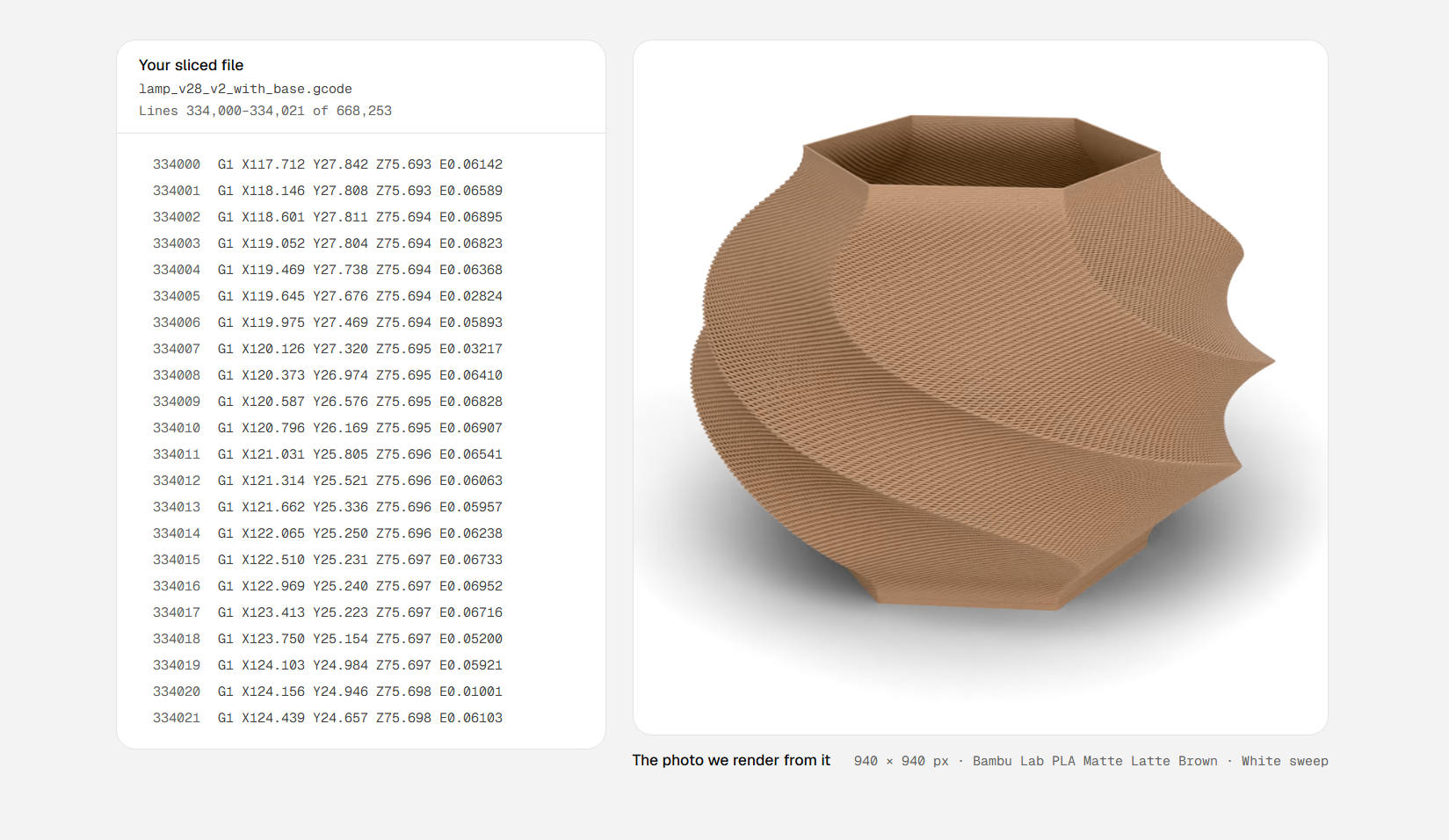
Summary: Standard CAD rendering solutions showcase idealized 3D models rather than real-world manufacturing output. Extrudio addresses this gap by parsing machine G-code to generate photo-realistic renders featuring actual layer lines, toolpaths, and manufacturing artifacts.
Key Takeaways
- Toolpath-Driven Visualization: Unlike standard CAD tools that render nominal geometry from STL or STEP files, Extrudio renders directly from machine G-code instructions.
- Physical Artifact Simulation: By sweeping a virtual bead of extruded filament across machine toolpaths, the software accurately depicts layer lines, seam lines, and curved surface stair-stepping.
- Commercial & Prototyping Utility: Enables online sellers and designers to quickly showcase realistic product variations across diverse staging environments without spending machine hours printing physical samples.
Detailed Overview
Computer-Aided Design (CAD) packages typically include built-in rendering environments ranging from basic textured previews to ray-traced, photo-realistic visuals. However, these tools render the mathematical ideal of the digital model—not the physical object produced by an extrusion-based 3D printer.
Extrudio bridges this visualization gap by generating realistic renders directly from the machine code that drives fused deposition modeling (FDM) hardware.
Detailed Breakdown
G-Code Toolpath Reconstruction
Rather than loading an STL or boundary representation file, Extrudio ingests sliced G-code. It constructs the rendering geometry by tracing the exact motion paths of the extruder nozzle, sweeping a virtual bead of plastic along every deposited line.
Through this method, the resulting model captures the intrinsic artifacts of the additive manufacturing process:
- Distinct horizontal layer lines across vertical faces
- Noticeable stair-stepping artifacts across shallow slopes, domes, and spherical geometry
- Realistic material deposition behavior determined by slicer toolpaths
Staging and Application
Extrudio allows users to place the generated parts into various digital staging environments, including:
- Clean, minimalist studio backgrounds
- Contextual sets such as a workshop bench or kitchen counter
This functionality offers particular value to digital storefront operators selling 3D printed products. While physical photography of a completed print remains the ultimate representation, G-code-based rendering provides a rapid way to generate compelling product listings and pitch mockups across multiple color options and slicing profiles without consuming filament or machine time.
Demonstration Video
Watch the workflow and rendering results in action:
Watch: Extrudio: product photos from your G-code on YouTube
Conclusion & Resources
- Extrudio Tool: Visit extrudio.site to explore the G-code rendering tool.
- Related Printing Techniques: Explore advanced slicing methods for horizontal overhangs without support.