This ESP32 Lets AI Control A Real iPhone
Summary: The open-source ESP32 iPhone Agent project pairs an inexpensive ESP32-S3 microcontroller with computer vision models to autonomously navigate a physical iPhone. By emulating a USB mouse and keyboard via iOS AssistiveTouch while receiving visual feedback through AirPlay, the setup interacts with the device without requiring jailbreaks or custom mobile software.
Key Takeaways
- Non-Invasive Device Automation: The system controls standard iOS devices without third-party app installations, developer tooling dependencies, or jailbreaking.
- Hybrid Architecture: An ESP32-S3 handles physical USB Human Interface Device (HID) emulation, while an external computer runs screen capture and vision-based AI planning.
- Vision-Driven Feedback Loop: Actions are tracked via AirPlay video streaming and GStreamer pipelines, allowing the agent to verify taps and dynamically correct pointer alignment.
Detailed Overview
A low-cost ESP32-S3 development board can enable an artificial intelligence (AI) agent to operate a real iPhone—tapping buttons, navigating menus, and typing text using natural-language instructions. The open-source project, titled ESP32 iPhone Agent, merges screen mirroring, a hardware USB mouse-and-keyboard emulator, and a vision model to automate iOS tasks cleanly from the outside.
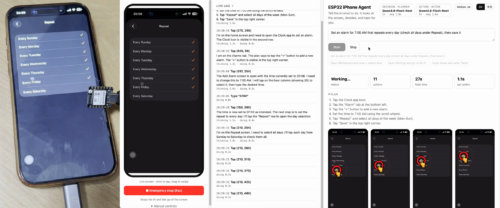 A real run: the agent plans, taps through “Set an alarm for 7:00 AM,” and logs every step. (Image: GitHub)
The project utilizes a Seeed Studio XIAO ESP32S3 board, priced at approximately US$7. The microcontroller does not run the AI model directly on-device. Instead, an external host computer inspects the iPhone's screen, determines an execution plan, and transmits execution commands to the ESP32-S3 over Wi-Fi. The board then physically delivers those commands to the smartphone via USB.
Released under the permissive MIT licence, the project provides full access to inspect, adapt, and redistribute firmware and host software.
Hardware Requirements
| Component | Role / Specification | Notes |
|---|---|---|
| Development Board | Seeed Studio XIAO ESP32S3 | Requires native USB support |
| Mobile Device | Physical iPhone | USB-C models connect directly; Lightning models require a Lightning to USB Camera Adapter |
| Host System | Mac or PC running macOS or Linux | Runs the server, vision pipeline, and AirPlay client |
| Peripherals (Optional) | USB-C hub with power pass-through | Keeps the iPhone powered during automation |
Deep Dive & Technical Insights
Vision and Execution Architecture
The system functions through a closed loop comprising real-time screen capture, AI processing, and hardware HID input:
- Screen Capture Pipeline: The iPhone mirrors its display wirelessly over AirPlay using
UxPlay, an open-source AirPlay server running on the host machine. AGStreamerpipeline breaks down the incoming video feed into individual JPEG frames for vision model parsing. - Planner and Actor Split: Processing is divided between two modular stages:
- Planner: Generates a high-level sequence of steps to fulfill natural language prompts.
- Actor: Analyzes the latest visual frame and selects the immediate, atomic action. The framework supports configuring a single model for both tasks or assigning distinct models.
- Hardware Emulation via AssistiveTouch: The ESP32-S3 connects to the iPhone via USB, presenting itself as a standard USB HID mouse and keyboard. When iOS AssistiveTouch is enabled, an on-screen pointer appears. Because mouse commands use relative movements rather than absolute coordinates, the host software tracks pointer positioning, performs alignment corrections, and validates whether simulated taps achieved the intended state on subsequent screen captures.
Installation and Setup
- Firmware Deployment: The ESP32-S3 firmware is compiled and flashed using
arduino-cliwith version 3.x of the ESP32 Arduino core. Wi-Fi network credentials and host IP configurations must be defined in the firmware settings prior to flashing via the provided script in the hardware repository directory. - Server Configuration: The host computer runs the control software within a Python virtual environment. Model connections and API authentication keys are configured via a
.envfile. Once initiated, the dashboard is accessible via a web browser (defaulting to port8890). - iOS Preparation: AssistiveTouch is toggled on under accessibility settings. The user connects screen mirroring to the "iPhone Agent" AirPlay receiver via the iOS Control Centre, followed by a calibration sequence to synchronize the pointer coordinate system with the display feed. Emergency stops and manual overrides remain available in the web interface.
Model Compatibility and Reported Benchmarks
The agent interfaces with any OpenAI-compatible API endpoint supporting vision inputs. This includes local hosting backends such as vLLM, SGLang, llama.cpp, and Ollama.
According to setup data shared by the author, running NVIDIA's Qwen3.8-Flash-Next-NVFP4 vision model locally across two NVIDIA DGX Spark systems yielded:
- Per-action latency: ~1.3 seconds (with thinking mode disabled)
- Planning step latency: ~2.0 seconds
(Note: These figures reflect that specific multi-system deployment and do not represent guaranteed operational speeds or overall task success rates across diverse environments).
Known Limitations
- Protected Surfaces: Protected screens—including passcode unlocking screens, DRM video streams, and Apple Pay interfaces—cannot be mirrored over AirPlay, blinding the agent.
- Display Sleep: Screen mirroring ceases if the phone goes to sleep; automatic screen lock must remain disabled during tasks.
- Input Constraints: Keyboard inputs are presently restricted to standard ASCII text, limiting localized multi-lingual text entry (such as Hindi or other regional scripts).
- Display Layout: Only portrait mode is supported; landscape orientations are incompatible. Additionally, modifying AssistiveTouch cursor speed settings invalidates existing calibration data.
Conclusion & Resources
The ESP32 iPhone Agent demonstrates a creative, non-invasive method for hardware-in-the-loop mobile automation. By shifting control to external hardware peripherals and standard accessibility features, it creates an adaptable testing ground for embedded developers, makers, and researchers exploring autonomous device manipulation.
- Source Code & Documentation: GitHub Repository (
onehumanbeing/esp32-iphone-agent)