
Let’s be real for a second: in additive manufacturing (AM), hitting the “Print” button is the easy part. The actual grind happens upstream. You spend maybe 20% of your time on core design or slicing, and the other 80% playing a miserable game of file-format ping-pong between disconnected software suites.
Anthropic just made a massive move to eliminate that friction. They’ve released eight new Claude AI connectors designed specifically to let users control creative and design software—including Autodesk Fusion, Blender, and SketchUp—using natural language.
By directly hooking a large language model into these 3D design tools, we aren’t just getting an AI chatbot that gives CAD advice; we are getting an automated pipeline orchestrator.
The Real Problem: The Coordination Gap
If you work in a service bureau or manage a heavy 3D printing workflow, you know that CAD tools, mesh repair utilities, and slicers notoriously refuse to talk to each other cleanly.
Ada Shaikhnag at 3D Printing Industry nailed the core issue perfectly:
“Most of that time surfaces in the coordination work between tools, where files are manually moved, reformatted, and handed off across software environments that were never designed to communicate.”
This is precisely where Anthropic’s connectors step in. Instead of writing custom batch scripts or manually fixing meshes before export, you can now instruct Claude to handle the synchronization, formatting, and file preparation across your pipeline.
Under the Hood: How the Connectors Work
Anthropic didn’t just build a superficial wrapper. They integrated deeply with the native APIs of these platforms. Here is a breakdown of the most critical integrations for the AM space:
| Tool | Integration Strategy | AM Pipeline Benefit |
|---|---|---|
| Autodesk Fusion | Two distinct Model Context Protocols (MCPs) | One MCP handles geometry creation/modification; the second queries and manages project-wide design data. |
| Blender | Python API exposure via natural language | Automates mesh repair, batch-applies changes across objects, and handles print-ready exports. |
| SketchUp | Conversational prompt-to-model | Sits upstream, allowing designers to generate starting geometries from text descriptions before build prep. |
| Affinity by Canva | Batch image/layer adjustment tools | Streamlines 2D asset prep, documentation, and layer operations before entering the 3D workflow. |
Pro-Tip: Autodesk’s decision to split Fusion into two separate MCPs (one for geometry, one for project data) is huge. It means you can query project parameters and dependencies programmatically without risking accidental conversational alterations to your active 3D models.
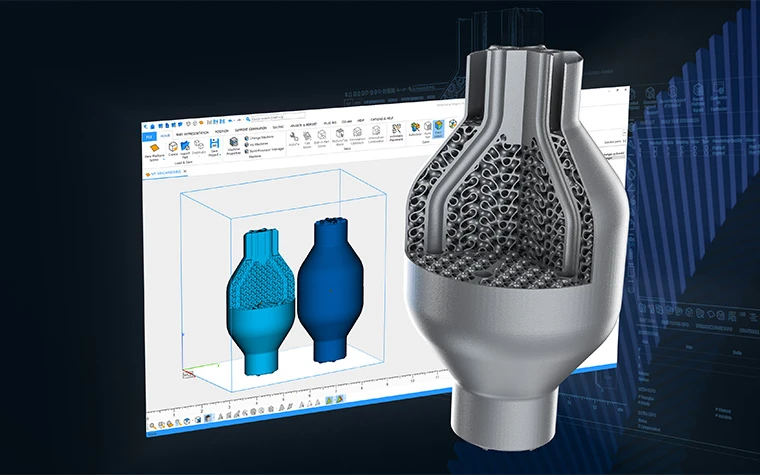 Visualizing complex AM preparation environments where Claude’s new coordination tools dramatically reduce manual UI clicking.
The Blender Python API Integration: A Game Changer
For independent designers and engineers who use Blender to prep geometry before throwing it into a slicer, the new Claude connector is a massive quality-of-life upgrade.
Instead of writing scripts from scratch to fix non-manifold edges or batch-export STL files, you just tell Claude what you need. Because Anthropic actually made a financial contribution to the Blender project to support continued Python API development, the integration here is incredibly robust.
When you ask Claude to “run a geometry check, fix mesh errors, and export my active selection as a print-ready STL,” the LLM dynamically generates and executes the necessary Python code under the hood:
import bpy
import bmesh

def fix_mesh_and_export_stl(obj_name, export_path):
    # Ensure correct active object
    bpy.ops.object.select_all(action='DESELECT')
    obj = bpy.data.objects.get(obj_name)
    if not obj:
        return "Error: Object not found."

    obj.select_set(True)
    bpy.context.view_layer.objects.active = obj

    # Enter Edit Mode: Remove doubles and patch non-manifold geometry
    bpy.ops.object.mode_set(mode='EDIT')
    bpy.ops.mesh.select_all(action='SELECT')
    bpy.ops.mesh.remove_doubles(threshold=0.001)

    bpy.ops.mesh.select_non_manifold()
    bpy.ops.mesh.edge_face_add() # Simple manifold patch
    bpy.ops.object.mode_set(mode='OBJECT')

    # Batch export print-ready file
    bpy.ops.export_mesh.stl(filepath=export_path, use_selection=True)
    print(f"Clean geometry exported to {export_path}")

# Claude executes this dynamically against your active Blender session
This effectively turns Claude into a senior technical artist sitting right inside your editor.
Why You Need to Adopt This Now
The additive manufacturing industry has desperately needed standard protocols for software handoffs. By leveraging the open standard of Model Context Protocols (MCPs), Anthropic is bypassing the legacy “walled gardens” of proprietary 3D formats. Claude is now capable of translating formats, restructuring data, and keeping assets synchronized across multiple applications—tasks that previously required dedicated pipeline engineers.
If you are running an AM service bureau or dealing with high-volume prototyping, manually managing file conversions and classifying incoming jobs is a waste of your engineering talent. Grab the new Claude connectors, plug them into your Fusion and Blender environments, and start automating your handoffs today. Your throughput will thank you.