
Most “AI for 3D” tools are a nightmare for actual fabrication. They spew out messy, non-manifold .glb or .obj files that might look great in a render but immediately fail in your slicer or CAD environment. If you want a 5mm mounting hole changed to a 6mm hole, you have to reroll the entire prompt and pray. It’s an unmaintainable black box [1].
CADAM completely bypasses this dead-end.
Instead of generating raw polygons, CADAM generates OpenSCAD code. It is an open-source text-to-CAD web application that parses natural language and images, generates programmatic 3D models, and natively compiles them right in your browser using WebAssembly. If you need a dimension tweaked, you don’t query the LLM again—you just drag a slider.
Why Generating Code Beats Generating Meshes
The magic of CADAM lies in its parameter extraction. When the underlying AI (often backed by Anthropic’s Claude models) writes the OpenSCAD script, CADAM identifies the mutable variables in the code.
Pro-Tip: Because the interface hooks directly into these variables, adjusting a dimension doesn’t trigger an expensive network request or an AI hallucination cycle. The updates compile locally in milliseconds.
Here is how CADAM compares to typical generative 3D tools you’ve probably tested:
| Feature | CADAM (OpenSCAD + WASM) | Traditional AI Mesh Generators |
|---|---|---|
| Output Payload | Functional .SCAD code & .STL |
Static .OBJ or .GLB |
| Editability | Fully parametric via sliders | None (requires mesh sculpting) |
| Execution | Local WASM compilation | Server-side rendering queues |
| Precision | Absolute (CAD-grade accuracy) | Guessed approximations |
| Extensibility | Supports BOSL, BOSL2, MCAD | N/A |
The Browser-First Architecture
We’ve been seeing a massive shift toward running heavy workloads in the browser, and CADAM leans hard into this. By utilizing WebAssembly, the heavy lifting of OpenSCAD compilation happens on the client side. The geometry is then handed off to Three.js for real-time previewing [1].
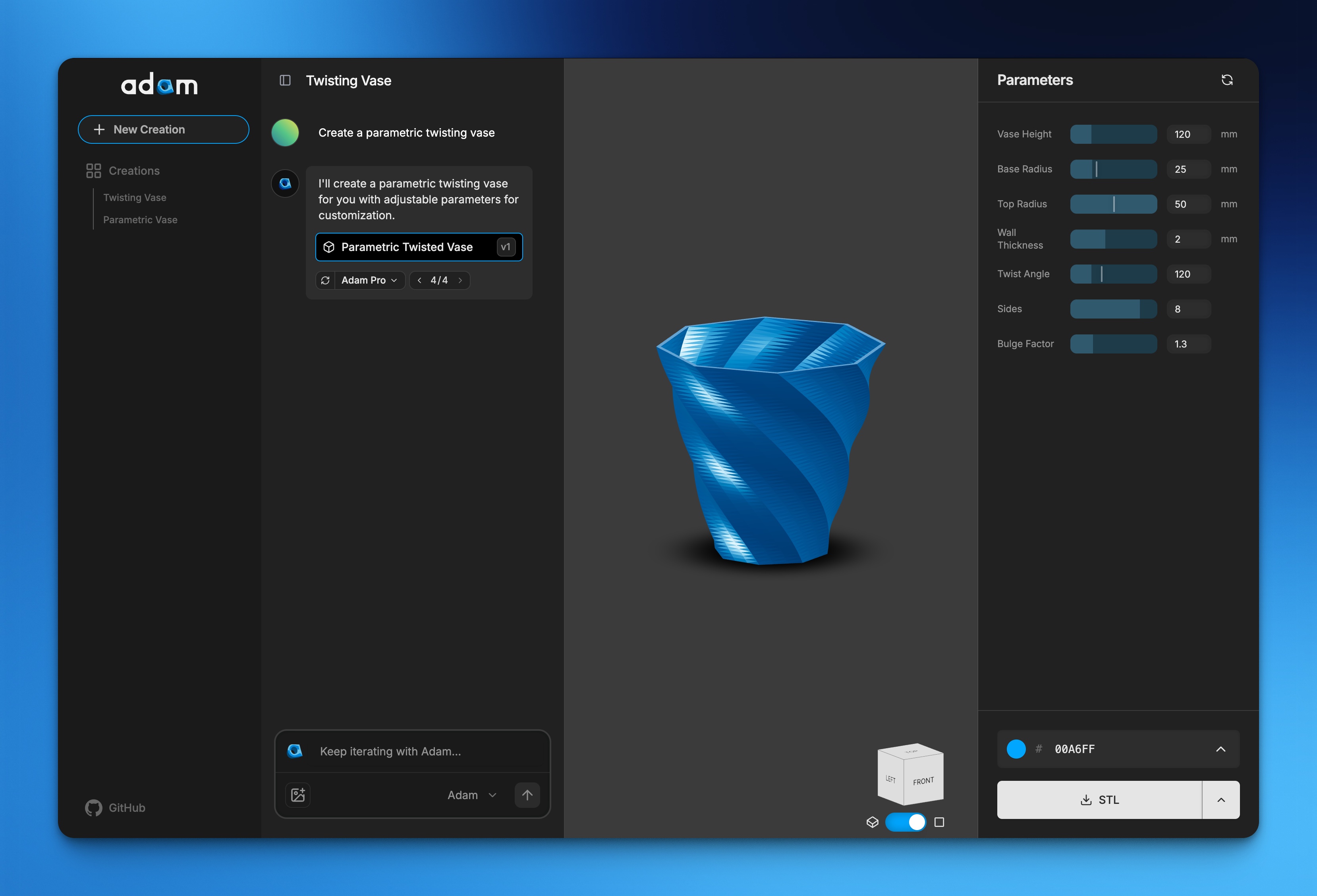
A look at the CADAM workspace where code, 3D rendering, and parametric controls sit side-by-side.
Key Capabilities You Should Care About:
- Natural Language & Image Inputs: You aren’t limited to text. You can upload reference images to guide the generation of the model [1].
- Smart Updates: If you change the underlying prompt, CADAM is smart enough to handle efficient parameter changes without burning through a full AI regeneration cycle [1].
- Built-in CAD Libraries: Anyone who uses OpenSCAD knows standard functions are limited. CADAM ships with library support for BOSL, BOSL2, and MCAD [1].
- Custom Typography: Built-in
Geistfont support means embedding text into physical prints doesn’t break the compiler [1].
Getting CADAM Running Locally
If you want to poke at the internal mechanics, the repository is actively maintained and open source (GPL-3.0) [1, 2]. The local setup utilizes Supabase for backend functionality and Ngrok for local webhook exposure (specifically for routing images to Anthropic) [1].
Here is the developer workflow to get it spinning on your machine:
- Clone the repository and install dependencies:
git clone https://github.com/Adam-CAD/CADAM.git cd CADAM npm install - Start the local Supabase instance:
npx supabase start npx supabase functions serve --no-verify-jwt - Configure Environment Variables:
Copy the
.env.local.templateto.env.localand add your Supabase test anon key [1]. Do the same for the Edge Functions environment in thesupabase/functionsdirectory. - Boot up Ngrok (required if you are passing images to the LLM locally):
npm install -g ngrok ngrok http 54321 - Start the development server:
npm run dev
“CADAM is the open source text-to-CAD web application… Transform natural language and images into 3D models. Interactive sliders for instant dimension adjustments.”
— The CADAM GitHub Repository [1]

The Verdict on Programmatic AI Design
We are finally moving past the novelty phase of AI design tools. Engineering and 3D printing require precision. A “curvy table” generated by a diffusion model is practically useless to a fabricator if the leg dimensions are baked into a mesh and off by 2mm. By leaning into OpenSCAD, CADAM forces the AI to establish rules, math, and variables. The resulting output isn’t just a model; it’s a reusable geometric algorithm.
Stop fighting broken vertices. Go check out the live demo at adam.new/cadam [1] or star the source code over on GitHub [1].